Image

With his elegant tuxedo and feline reflexes, Tuxifer Bruce Nibbler – a.k.a., Tuxy B – could easily be mistaken for the famous secret agent James Bond. But, unlike a master spy, Tuxy's work is no secret. Tuxifer proudly shared his updates with the Sites Pro world through a series of deployments between April and August 2025. Here's a look into this release's flurry of features, fixes, and flair.
Tuxy B aims to please, so his release includes the following new functionality – most of which were specifically requested by our customers.
This new navigation menu allows a standalone group of pages to have its own separate menu structure, completely independent from the Main Menu.
For example, you may have a section of content that doesn't quite fit in with your site map, or a unit in your department needs a "subsite" of related pages that shouldn't be accessible through your main menu.
Previously, the Action Menu only allowed 1 orange call-to-action "button" in the header. However, after reviewing multiple use cases, we've added the ability to add additional items to the menu (as you can see in the image above!). However, we still recommend keeping the number low – 1 or 2, at the most – for an optimal user experience.
Like spellcheck, but for web accessibility guidelines! The yellow widget in the bottom right corner of the edit screen displays accessibility alerts and tips, to help you make smart choices as you're working on your content.



As outlined in our Tuxy B preview article, one of the biggest changes for site editors is a major upgrade of the WYSIWYG editor on body and text fields.
Specifically, this includes:
After the initial upgrade, we also addressed user-reported issues with the new version, including a request to reinstate the spellchecker function (that had become a premium feature in this version), address bugs with anchor links and link fields, and disable table cell merging to meet accessibility guidelines.

Some cats bring mice and other backyard "gifts" to their owners. Instead, our Tuxy B brought user interface changes to help our admins and editors manage sites with confidence.
Tuxy's first gift was the previously announced login requirement to access the Preview pane to enhance content security.
However, this change made it more challenging for your unpublished content to be reviewed by someone who does not have an account on your site.
Now, all you need to do is add a user account for the reviewer, with no roles assigned. Send them the URL to the unpublished item on your -content Drupal site, and they'll simply log in with their NetID and have instant access to the Preview pane (without any admin or editing access).
The list of user accounts on the People tab can get overwhelming, especially if you don't have everyone's NetIDs memorized. To make user management easier, you can now add a Name to each account.

We also further reduced confusion by identifying the required OIT staff accounts, designated by "(OIT)" in the Name field.
The interface for adding a new user got a light refresh, as well – with more detailed instructions to help avoid common errors when creating new accounts.
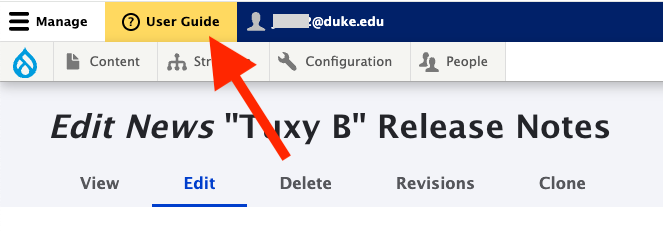
You may have noticed the cheerful yellow User Guide button in the upper left of the admin site. This will point you directly to our user documentation on userguide.sitespro.duke.edu. We hope this is particularly helpful to new users during onboarding!

Tuxifer Bruce is a big fan of safety and stability – just ask his mom, web developer Cole Archer, who rescued him on a drive home from work back in 2021. To show his appreciation for a secure infrastructure, Tuxy released these improvements to the system:
Other gifts from our sweet and silly Tuxy B include:

Tuxy B and his many updates are winning over hearts across campus. Even Tuxy B's human cousin, who prides himself on being a dog person, says that "dogs are the best, unless it's Tux, because Tux is the best." We have to agree!
User Guide documentation will be updated shortly, but contact us if you have questions in the meantime! Also, we'll happily accept your ideas for future releases through our New Feature Request process.
A special treat for anyone reading this far: Sites Pro recently celebrated its fourth anniversary, and we're looking ahead to the future! Keep an eye on the Teams User Group for info about upcoming system updates to keep your sites as modern and beautiful as ever... And don't worry – we’ll do the heavy lifting, so you can simply enjoy the results!